BombitUP
The Ultimate SMS & Call Prank App
Send unlimited SMS messages and calls to prank your friends and family. Available as a downloadable APK for Android and online version for all platforms.
| App Name | BOMBITUP |
| Version | V4.4.5 (APK) |
| Size | 55.7 MB |
| Requires | Android 5.0 & Above |
| Online Version | All OS (iOS, macOS, Windows & More) |
| Utility | SMS Prank App |
| Downloads | 69M+ |
| Online Version Status | WORKING |
| Last Updated | November 2025 |
BombitUP is created solely for entertainment purposes to prank friends and family in a lighthearted manner. This application should only be used with the consent of recipients and in a responsible way. Any misuse of this application for harassment, spamming, or malicious intent is strictly prohibited and may result in legal consequences.
Features Of BombitUP APK
Here are some of the perks that you can enjoy with our SMS & calling prank app
SMS Bomber
Send unlimited SMS messages to any phone number instantly. Perfect for pranking your friends with a flood of text messages that will keep them guessing.
Call Bomber
Bombard your friends with multiple calls in quick succession. A hilarious way to prank someone and watch them scramble to answer all the incoming calls.
Email Blast
Send bulk emails to prank your friends’ inboxes. Fill their email with harmless fun messages that will leave them surprised and entertained.
WhatsApp Bomber
Target WhatsApp with rapid-fire messages. A modern twist on pranking that works with one of the world’s most popular messaging platforms.
Easy to Use UI
Simple and intuitive interface designed for everyone. No technical knowledge required – just enter the details and start pranking with a few taps.
No Downtime
Always available and reliable service. Our servers are constantly maintained to ensure you can prank your friends anytime without interruptions.
Download & Install BombitUP
BombitUP is your go-to app for harmless pranks and fun with friends. Send anonymous messages, make prank calls, or send funny emails – all in good spirit and for entertainment purposes only.
This versatile prank tool lets you playfully surprise your friends with SMS bombing, call flooding, email blasts, and WhatsApp messaging features that add excitement to your social interactions.
Installation Guide
1 Enable Unknown Sources
Since BombitUP is not available on the Play Store, you’ll need to allow installations from external sources. Here’s the simple process:
- Navigate to your device’s Settings
- Find and tap on Security or Privacy
- Locate Unknown Sources or Install Unknown Apps
- Enable the option to allow app installations from external sources
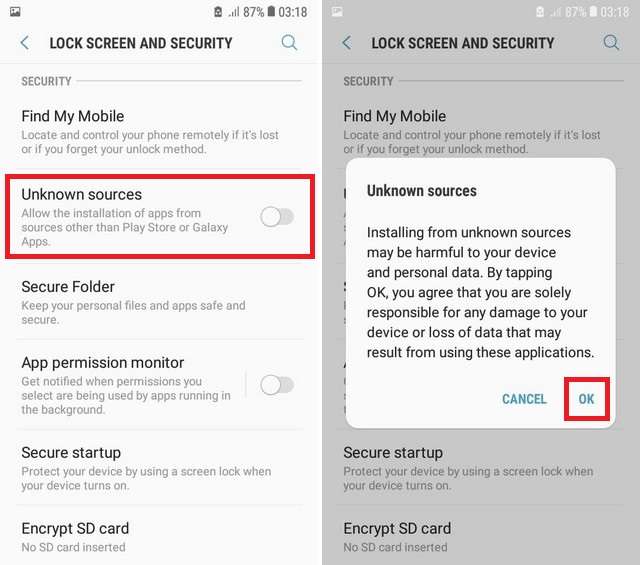
Enabling this setting allows apps from outside the Play Store to be installed. Always download from trusted sources like bombitup.app. You can disable this setting after installation for added security.
2 Download the APK File
Get the official BombitUP APK file from our trusted source:
- Click the Download Latest Version button above
- Ensure you’re downloading the newest version for optimal performance and features
- The file will be saved to your Downloads folder
- Verify the source is bombitup.app for safety
3 Install BombitUP
Installing the app is straightforward and takes just a minute:
- Open your File Manager or Downloads folder
- Locate the BombitUP.apk file you just downloaded
- Tap on the APK file to begin installation
- When prompted, tap Install to proceed
- Wait a few seconds for the installation to complete
- Once done, tap Open to launch BombitUP
Congratulations! BombitUP is now ready to use. Start pranking your friends responsibly and always remember to get their consent for the best experience.
What Our Users Say
Thousands of happy pranksters sharing their experiences with BombitUP
Frequently Asked Questions
Everything you need to know about BombitUP
How to stop BombitUP messages?
If you’re receiving unwanted messages from BombitUP, there are several ways to protect yourself:
The most effective method is to add your number to our Protection List. Once added, your number will be blocked from receiving any messages through BombitUP. You can add your number to the protection list by visiting our Protection Page.
Alternatively, you can temporarily enable Flight Mode or Do Not Disturb mode on your device to stop incoming messages and calls until the prank stops.
Remember, BombitUP is meant for harmless fun between friends, so if someone is misusing it, you can always report the abuse.
Can BombitUP be traced?
No, BombitUP messages cannot be traced back to the sender through conventional means.
The app is designed to send messages anonymously through various gateway services, making it extremely difficult to identify the original sender. The messages are routed through multiple channels and APIs, which masks the sender’s identity.
This anonymity is one of the core features that makes BombitUP popular for harmless pranks. However, this also means users should be responsible and only use it for fun with people who appreciate the humor.
How does BombitUP work?
BombitUP works by utilizing multiple SMS gateway APIs and messaging services to send bulk messages to a target phone number.
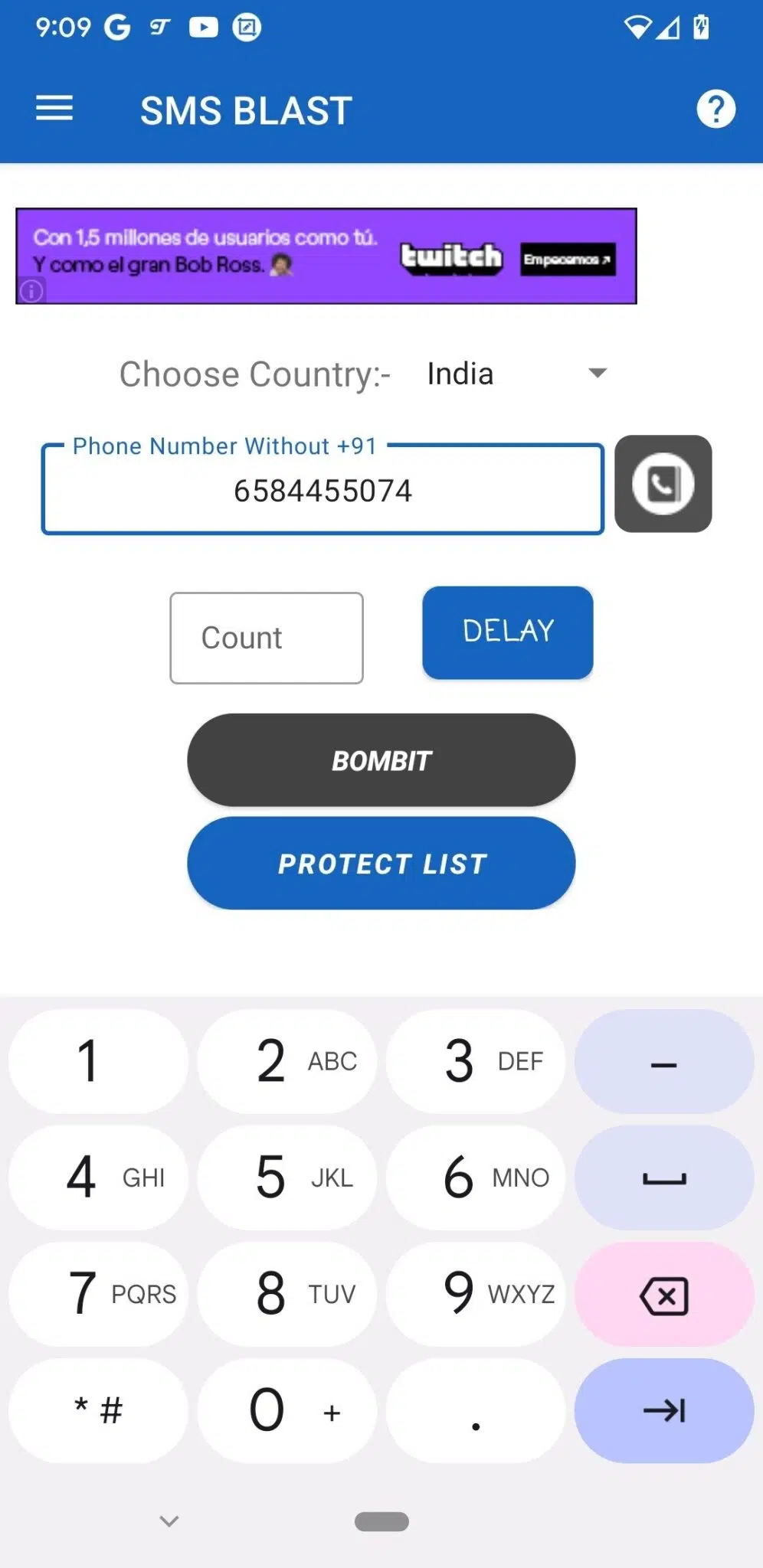
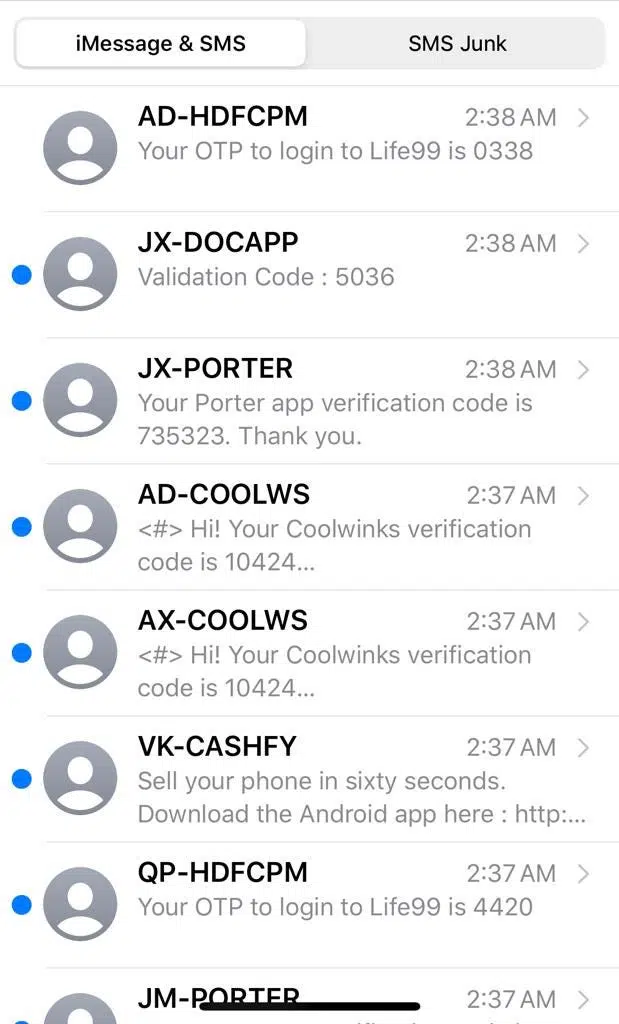
When you enter a phone number and initiate the bombing, the app sends requests to various online services that offer OTP (One-Time Password) or verification SMS features. These services then send legitimate messages to the target number, resulting in a flood of texts.
The app continuously rotates between different APIs and services to avoid rate limiting and ensure consistent delivery. This is why the messages appear to come from different sources and companies.
Similarly, the call bomber feature works by triggering verification calls from multiple services simultaneously, creating a rapid succession of incoming calls.
How to block BombitUP?
There are two primary ways to block BombitUP messages and calls:
1. Protection List (Recommended): Add your phone number to our official Protection List at bombitup.app/#protection. This permanently blocks your number from being targeted through our platform.
2. Flight Mode: Enable Flight Mode or Airplane Mode on your device temporarily. This disconnects your phone from the network and stops all incoming messages and calls until you disable it.
The Protection List is the most effective long-term solution, while Flight Mode is a quick temporary fix during an active prank.
How to find BombitUP sender?
Unfortunately, there is no direct way to identify who sent BombitUP messages to your number due to the anonymous nature of the service.
The app is specifically designed to protect sender anonymity, and the messages are routed through multiple third-party services, making it virtually impossible to trace back to the original sender.
However, if you believe someone is seriously misusing the app to harass you, you can try contacting our support team at [email protected]. While we cannot guarantee we can identify the sender, we may be able to help in cases of genuine abuse or harassment.
For serious cases, we recommend also contacting local authorities with evidence of harassment.
Is BombitUP safe?
Yes, BombitUP is safe to use when used responsibly for its intended purpose – harmless pranks among friends and family.
The app itself does not contain any malware, viruses, or harmful code. It doesn’t access your personal data, contacts, or any sensitive information on your device. The app only requires basic permissions to function properly.
However, safety also depends on responsible usage. The app should only be used with the consent of recipients and for lighthearted fun. Misusing it for harassment, spamming strangers, or causing distress is against our terms of service and may have legal consequences.
We encourage all users to prank responsibly and respect others’ privacy and peace of mind.